TLDR: you should leave a comment, either spam or not, so I can test how well this system works!
If you want to check out the code, here's the GitHub.
I really appreciate Mataroa, the blogging platform this post is on. It's easy to use, basically free, very performant, and looks different than Substack.
But there's one thing that annoys me a bit: the comment moderation system. Moderation is a famously tricky problem, so Mataroa leaves it up to the writer to individually approve or deny every comment. It's a reasonable system, but I also have to deal with hundreds of comments that look like this:
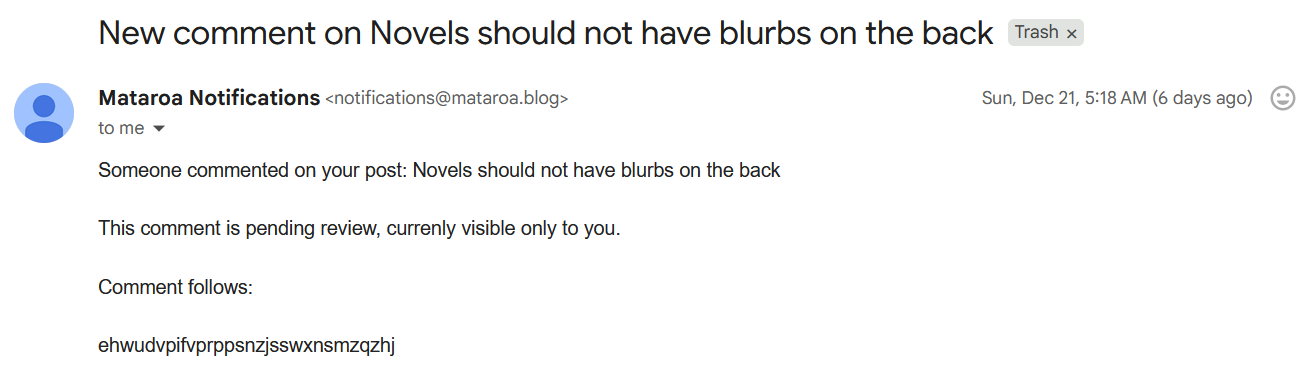
Like, what even is this? I understand the spam comments which are clear SEO attempts. But really, random strings of characters? Is someone messing with me? Is the CIA trying to send me a message? Are there just bots on the internet who are literally spamming every form they can find with lowercase consonants?
Anyways, I've let my comment backlog build up, and I wanted to build a system to take care of the obvious spam. My basic goal was to have an AI model classify every comment: the system would delete clear spam while it would email me the potentially useful comments for me to make the final decision.
Google Apps Scripts as my backend
The first decision I needed to make was how I was going to run the system. I could write a python script and figure out how to run it daily (or hourly), but I ended up using Google Apps Scripts instead, a JavaScript variant which has tight integrations with Google's web apps.
When I started this project, Mataroa's API didn't let me control comment requests. (More on that later). But, every time someone submitted a comment, Mataroa would send me an email with links to approve or delete the comment. So I decided to try to use my email as a de-facto comment-moderation API. Google Script has a Gmail integration that doesn't require me to go through OAuth, so it was the natural choice.
I had a solid plan of attack, I thought: I would set up a Google Scripts trigger to run a script every hour which would
- Search my inbox for any emails from
notifications@mataroa.blog. - Scrape each email for the comment.
- Use an LLM API to classify whether the comment was easy spam.
- Delete the comment, or forward it to another email for me to double-check.
Steps 1 through 3 were quite straightforward. Step 4 was not.
Obtaining the emails containing comments
Mataroa sends me every comment request via the email notifications@mataroa.blog, so the first step was to collect all the requests into one place. I needed to search through my inbox for emails notifications@mataroa.blog and then turn each email into a comment.
Luckily, Google Scripts had good tools for this, given that I use a Gmail account for Mataroa. Scripts is a JavaScript variant which includes built-in APIs for connected Google products like Google Docs, Google Calendar, or Google Sheets. In the case of Gmail, the API is the GmailApp object.
Searching is very easy: just use the GmailApp.search with the search term that I would use in the Gmail interface itself. In this case, I'm looking for every single email from notifications@mataroa.blog that isn't in the trash:
function firstPassOnComment() {
  const threads = GmailApp.search('from:notifications@mataroa.blog');
  threads.forEach(emailThread => {
    messages = emailThread.getMessages();
    messages.forEach(email => {
          processEmail(email);
    });
  });
}
There is one wrinkle, though. The search results return email threads rather than individual emails. But that's easy to deal with: all I need to do is get each message from the threads.
This code is making an important decision: deal with comments one at a time. Because each comment requires a distinct LLM call, they will take at least a couple seconds to process. If I were processing hundreds of comment requests an hour, I would want to send multiple LLM calls at once. Since there's only a couple a day right now, I prefer the simplicity of dealing with each comment one at a time.
Parsing the email content
After I've gotten every single message, I need to process them into a format I can deal with programmatically. Eventually, I send the comment content and the post title to the LLM, so I need to extract both of those. I also want the comment ID, for later.
If I was going to write the script today, I would get both of these from Mataroa's API. At the time, though, all I had was the emails. Luckily they come in a structured format:
Someone commented on your post: POST TITLE

This comment is pending review, currenly visible only to you.

Comment follows:

TEXT OF THE COMMENT

---
See comment:
https://liquidbrain.mataroa.blog/blog/the-noticing-game/#comment-COMMENTID

Approve:
https://liquidbrain.mataroa.blog/blog/the-noticing-game/comments/COMMENTID/approve/

Delete:
https://liquidbrain.mataroa.blog/blog/the-noticing-game/comments/COMMENTID/delete/
Assuming this format would stay fixed, I wrote three helper functions to get the POST TITLE, TEXT OF THE COMMENT, and COMMENTID respectively:
function getPostTitle(message) {
  const body = message.getBody();
  const startMarker = "Someone commented on your post: ";
  const startIndex = body.indexOf(startMarker) + startMarker.length;
  const endIndex = body.indexOf("This comment is pending review");
  const title = body.substring(startIndex, endIndex).trim();
  return title;
}

function getCommentContent(email) {
  const body = email.getBody()
  const startOfCommentIndex = body.indexOf("Comment follows:") + 20
  const endOfCommentIndex = body.length - body.split("").reverse().join("").lastIndexOf("---") - 4
  const comment = body.substring(startOfCommentIndex,endOfCommentIndex)
  return comment;
}

function getCommentIDFromEmail(email) {
  const body = email.getBody();
  let parts = body.split("/")
  return parts[parts.length-3];
}
If you read through the code blocks, you might notice that I'm not using regular expressions to extract text content, but am instead using rather ugly code to split up the email text. I made this choice for two reasons. First, I didn't really want to learn about regular expressions for the project nor use AI to write them (see Appendix). Second, I have no control over the comment text, so I need to be careful to write code which does not depend on the content of the comment at all.
For instance, the getCommentContent function figures out the first occurrence of Comment follows: and the last occurence of ---; these do not depend on the comment content as the rest of the email structure is fixed.
Classifying the comment with an LLM
My processEmail function begins by scraping the email and then calling a moderateComment function. But how am I moderating the comments?
Current LLMs (Large Language Models) are quite good at this type of task, especially since the stakes are pretty low: if an attacker tricks my moderation system, I still need to manually approve the comment. So I decided I wanted to try setting up a prompt system. I chose Gemini Flash because it's very cheap but offers good performance.
Calling the LLM
If I was working in regular JavaScript or in Python, I could make LLM requests through a nice interface. However, Google Scripts does not offer this functionality built-in.1 To use a Gemini model, I'd need to make an API request itself. Luckily, Google offered some sample code in a demo, and I've done this before myself.
There's a lot of boilerplate code I won't explain, but the basic steps were to a) make a prompt containing the comment and instructions to classify it b) create a JSON object that contained the prompt and response settings I wanted c) make a fetch request using Google Script's UrlFetchApp d) parsing the response.
I made a couple of decisions along the way. First, I chose to use a structured response: all I needed from the LLM to respond True or False to whether the post is spam. Knowing the exact format of the output makes including it in a pipeline much easier. Second, I set the thinking budget to -1 (which prevents the model from producing thinking tokens) to keep costs down.
Deleting spam comments
This ended up being the most difficult part of the whole project. It was only solved after I left a issue on the Mataroa GitHub.
As I've mentioned before, Mataroa had no comments API when I started this project. One could delete buttons manually by navigating to a delete page and pressing a button, so I thought to automate this process using HTTP requests.
The crucial part of the delete page used this HTML:
<main class="delete">
<h1>Are you sure you want to delete this comment?</h1>
<p>COMMENT CONTENT </p>
<form method="post">
<input type="hidden" name="csrfmiddlewaretoken" value="CSRFTOKENVALUE">
<input type="submit" value="Confirm delete" class="type-danger">
</form>
</main>
The first challenge was reaching this page in the first page. If I made a fetch request for https://liquidbrain.mataroa.blog/blog/the-noticing-game/comments/COMMENTID/delete/, I would get a "permission denied" request because I didn't give authentication information. However, I was able to extract a working sessionid token by opening the delete page in the browser and going to web tools. Using the sessionid let me access the page.2
The second challenge was triggering the form. Using developer tools, I was able to figure out the network call that clicking the delete button trigger. When I tried to replicate that network call, however, I got a 403 permission denied error. Even after playing around with the request parameters and other debugging, I wasn't able to figure out how to get around the server's security measures.
Requesting an Mataroa feature
After spending 30 minutes on this, I started to feel that this whole process was too hacky and unlikely to succeed. What I really needed was a programmatic way to delete comments. If I couldn't do it in a hacky way, I'd have to request an addition to the API.
I posted a feature request on the Mataroa GitHub for API access to comments. A month later, the project developer Theodore Keloglou added the feature to the API, for which I'm very grateful. The resulting code was much simpler!
function deleteComment(id) {
  const commentURL = `https://mataroa.blog/api/comments/${id}/`
  let response = UrlFetchApp.fetch(commentURL, {
    method: 'delete',
    'headers': {
      'Authorization': `Bearer ${mataroaAPIKey}`
    },
  });
}
I did learn one tricky detail about making Fetch requests. I initially forgot to include the trailing slash in the commentURL which turned my DELETE HTTP request into a POST request. I was really confused why this was happening — I initially thought it was a restriction by Google Script — but everything worked after I added the trailing slash in.
Dealing with moderated comments
The last step was to delete the spam comments and forward the rest. Again, with Google Script's built-in features, this was mercifully easy:
if (isSpam) {
    deleteComment(commentID);
    console.log(`deleted comment ${commentID}`)
    email.moveToTrash();
  } else {
    console.log(`WILL FORWARD to personal email ${commentID}`);
    email.forward(emailToSendTo);
    email.moveToTrash();
  }
Testing and deploying the script
After all that work, I was finally able to test the script. (I'd been testing individual functions for a while).
I decided not to write programmatic tests for this project because a) I don't know if Google Script has a good testing framework b) it seemed more difficult to simulate deleting a comment than to check whether the script actually deleted comments appropriately. Luckily, the previous five and a half months had given me a lot of spam comments to look at.
I needed to check four main functionalities:
- Could the script classify comments correctly?
- Could the script delete and forward comments as necessary?
- Did the whole system work once?
- Did the whole system work when running every hour? And I needed to follow that order because once I deleted a comment, I couldn't revert the change.
For each, I made the obvious choices. For (1), I had the code print out what the moderation decision would be and manually checked if that was reasonable. So far, the system has been 100% right in its judgements. (2) I took individual spam comments and checked if my script successfully deleted them. (3) I ran the script on my whole backlog, now with deletions and forwards.
(4) required a little bit more work. Google Scripts allows one to run a script every hour using a time-based trigger, which is how I'm currently deploying it. But I wanted to make sure the trigger was working. So after I had completed testing steps (1)-(3), I populated several spam and non-spam comments on the blog, waited an hour, and checked whether the script worked.
It did, so I set the trigger and let it run. It's been going for a week now without any errors.
Conclusion
This project is already looking to be one of my most useful.3 I cleared through my entire ~100 comment backlog, which included several genuine comments that I had missed. In the week since I've finished it, it's been chugging along still removing spam comments. And if I blog more in the new year, this might end up being a really useful piece of infrastructure for my blog.
The system also doesn't seem to cost that much: in December, I spent $0.50 on API calls, even after working through the entire comment backlog several times. I expect to spend less than $5 next year on this commenting system.
More importantly, coding this project was fun. I've gotten a lot less time to code since I've started working as a journalist at Understanding AI, and I've missed the feeling of getting to play around with a computer and build stuff that I will use. This was a small side project, but I still had fun.
As part of having fun, I didn't have AI write any of the code. I've written previously about how I use LLMs in personal coding projects, particularly those where I'm trying to become a better programmer. Generally, I think I'm still at the state where I learn more by coding (almost) everything by hand. So for this project, I decided to use no LLM-generated code, which was especially doable given how small the project is (~140 lines of code). However, I did lean heavily on assistance from Claude (if you're curious, here are my two chats where I worked on this projects: first, second).
I definitely learned more from writing the code myself, and it was a lot of fun, but I'm still a little conflicted whether this was the right choice. The process took a lot more time than it would have otherwise. And, as someone in a primarily non-technical role where my coding needs are generally throwaway scripts, I probably should improve at using Claude Code or other coding agents because ultimately efficiency is a higher priority at work.
But anyways: I think this project was a success. If you'd like to support this success: drop me a comment below! Feel free to try to trick the LLM into including an obviously bad comment!4
Notes
-
It really would be nice if they made a built-in GeminiApp. (There are third-party options, like this repository) But of course, Google is famous for making Gemini very hard to use. ↩
-
I realize this was probably a bad idea for security reasons. But I was feeling curious and wanted to see what happened. Probably don't try this for production? ↩
-
My most useful project is still probably Fixing Claude's Enter Key, which is a browser extension that changes the default behavior of the Enter key on claude.ai from submit to new line. (Chrome, Edge versions). ↩
-
I reserve the right to not publish particularly bad comments. ↩
Cool. I hope you're able to make commenting work easier in the future!
That worked perfectly! Thanks Harry